
New release: sklera 4.5.3
Automated Proof of Play reporting and many tweaks
sklera release 4.5.3 is now available for all our cloud customers. Many of the changes and improvements we made to the previous releases 4.5.1 and 4.5.2 are now coming to fruition – e.g. in the shape of the new automated proof of play reports.
We also significantly improved our support of YouTube live streams – the sklera player now automatically detects whether a live stream is currently active or not, and depending on a setting will then show the live stream, the last recorded stream, or skip the spot entirely.
And our municipal notice board module has received a gentle facelift as well as a new feature – but more on that later.
Automated Reports
Proof of Play logs have long since been a core feature of our solution. Analyzing those logs just became a lot more simple for our sklera professional users with the addition of automated reports.
A new report is created with just a handful of clicks: select an item from the library, how often the report should be generated, and optionally add e-mail addresses which should receive the report. That's it – the system now automatically handles the report creation.
By default reports are generated as a PDF document. sklera automatically determines which displays the content is assigned to and compares it to the actual playbacks.
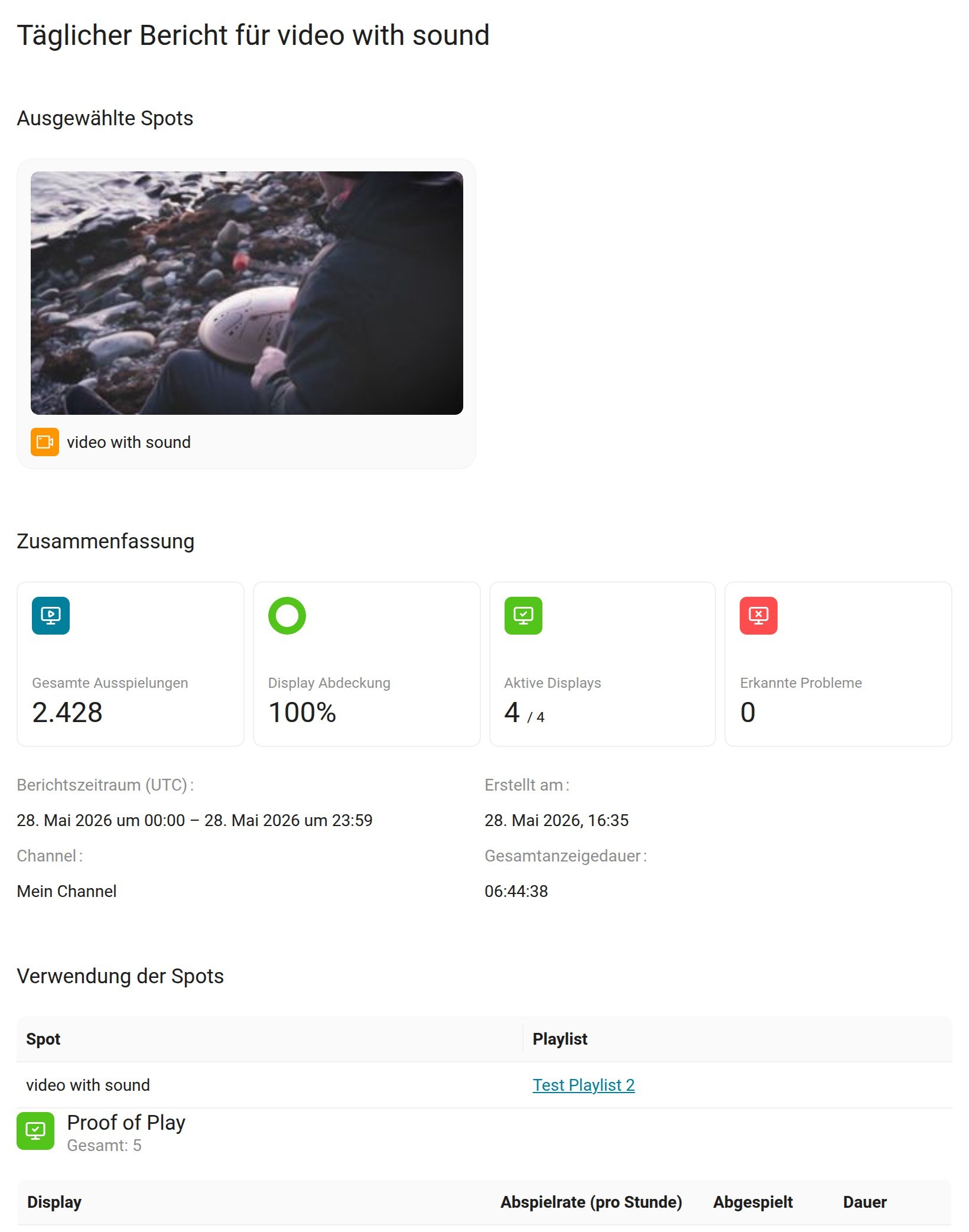
Reports can be generated daily (for the previous day), weekly (previous full week), monthly (last calendar month) or going by the validity times of the item – or any combination thereof.
The report lists in detail on which screens and how often the content was running in the selected period. You'll immediately see a summary as well: on how many screens was the content actually played, how many playbacks in total were recorded – and it also shows if any issues were detected.
Any detected problematic screens will be listed in detail as well. Problems detected may range from screens with a spotty connection over screens which have been offline for a week or more to spots which have never been played.
And if you prefer working with the raw data yourself – no problem. The report data is also available as CSV or Excel documents, much like you would receive from regular proof of play reports – with the added benefit of automatically generating and sending them!
Tweaks for the notice board
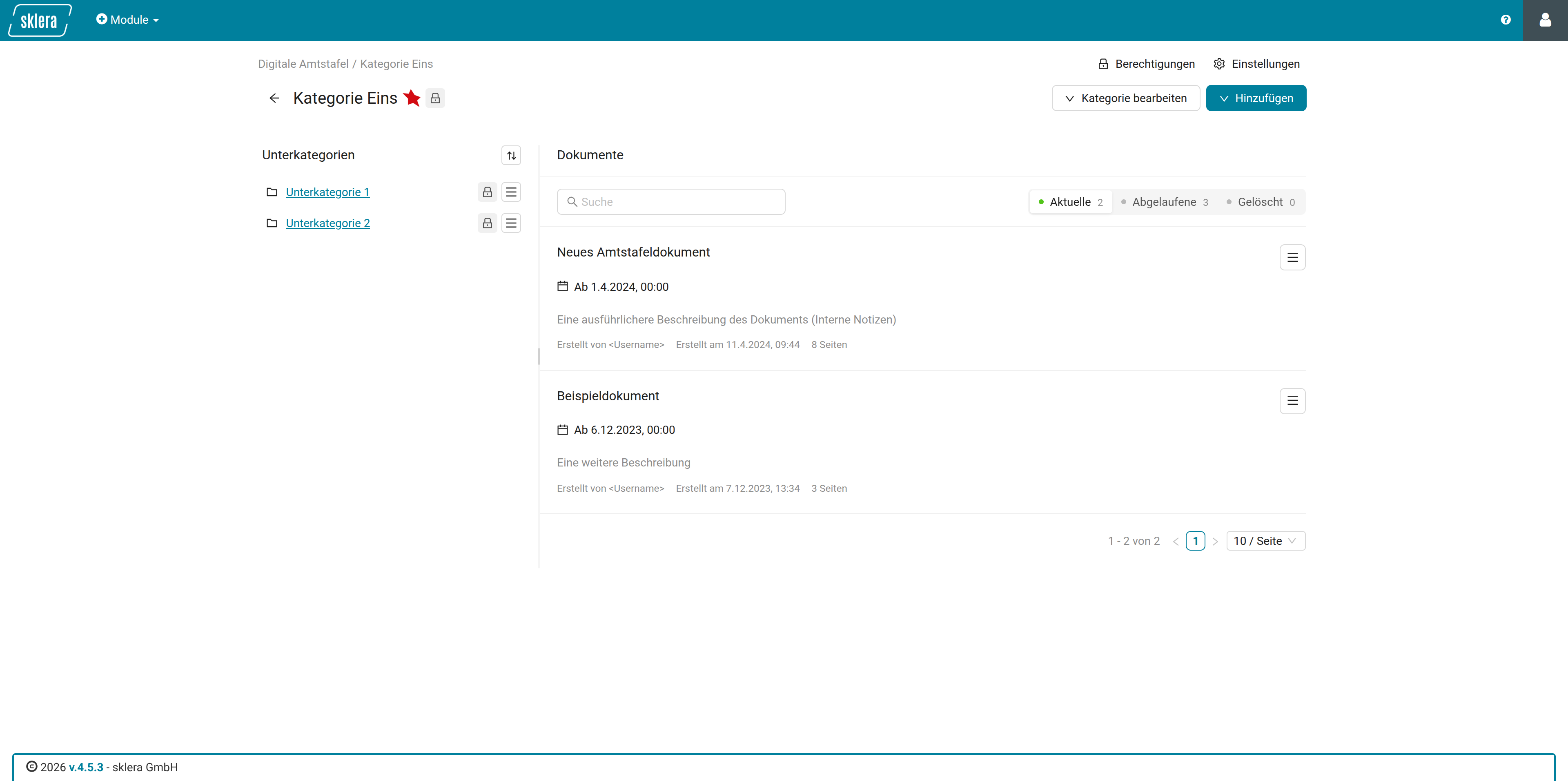
We somewhat redesigned the municipal notice board – mainly a cleanup, grouping similar functions together... but it's not only a facelift.
Categories where a large number of documents were uploaded were prone to become an unmanageable mess – even with the distinction of active, lapsed, and deleted documents. To combat this we now paginated the display, and we introduced a search field to help you narrow down documents even more to the ones you're looking for.
And we added a new function as well – you can now define additional optional recipients for individual documents. Hitherto all additional recipients in the module received the automatically generated final reports for every single document. Now you can define additional recipients for individual documents, who will only receive the final report for the document in question. A powerful addition to keep stakeholders in the loop for specific documents as opposed to spamming them with irrelevant reports!
More new features & fixes in 4.5.3
Tweaks & new features in 4.5.3
- Additional settings for 4K output on AlphaX Players (both directly in the device settings as well as via policies), as well as a app watchdog for it.
- Entra ID interface: Entra Group IDs can now be added to sklera user groups. User logging in via Entra ID will be automatically be assigned to any sklera user group where matching group IDs are found. This way you can automatically manage permissions in sklera for any user using SSO.
- Room Manager module, event table: long description texts are now truncated in the table, resulting in a much more compact view of all events created in the room manager.
- Remote Control: Added a new function to send selected screens into standby.
Bugfixes in 4.5.3
- Room Manager iCal calendar: Bug fixes related to the Groupwise iCal Format
- RSS Feeds: Some data fetching optimizations which will reduce or eliminate problems in fetching recent RSS data
- Room Manager: Smaller bug fixes related to the Oracle Hospitality interface
- Remote Control: Fixed a small problem with the pause function not triggering reliably
digital signage made easy