
New release: sklera 4.5.1
Usability improvements, programmatic advertisement integration, and support for new devices
Release 4.5.1 of sklera brings another step forward in our efforts to attain our goal of making digital signage easy. Much legwork was done by making adjustments and updates in the background in order to put a foundation for future updates in place.
The biggest addition to sklera this release is that we now enable you to place dynamic advertisements on your screens – thanks to our brand new integration with the SSP1 advertisement network. Beyond that sklera now supports Sony Bravia Pro signage displays as well as Samsungs' E-Paper EMDX devices, further expanding the ever growing list of Digital Signage devices compatible with sklera.
Also, on top of some visual tweaks, we added a new quality of life enhancement for users who spend a lot of time on the screens page or in user management: the column configuration of the tables now persists, and you'll be able to create presets, and can even resize and reorder columns!
SSP1 integration
The newly created SSP1 integration with sklera enables you to bring dynamic advertisement on your screen and monetize them – all with just a few clicks.

The core features of this integration:
- Location and inventory management: Location and device data can be imported to sklera from existing SSP1 inventory – and vice versa, you can send your existing screens to SSP1 directly via the CMS. Attributes such as categorization, number of expected impressions, booking types, maximum duration of ads etc. are supported.
- Reporting: The playback of ads is logged both in skleras reporting as well as transmitted to SSP1 – enabling you to easily track the impact of the ads.
- Simple placement of ads in your playlists: Our specially developed HTML5 app can be simply dropped in any of your playlists – it automatically determines qualifying ads and display duration and shows them. And if no relevant ads are found the player simply skips to your regular scheduled content.
Improved Tables
Certain tables in the sklera CMS – such as the one on the screens page – since long feature the capability to configure which columns are shown. Not every user needs all columns at all times, after all, and a lot of times you only want a certain subset. This was somewhat cumbersome so far, as columns always had to be selected manually. And sometimes the width of the column wasn't exactly enough for what needed to be shown.
The table on the screens page as well as the user management table received a rework in this release, extending their functionality:
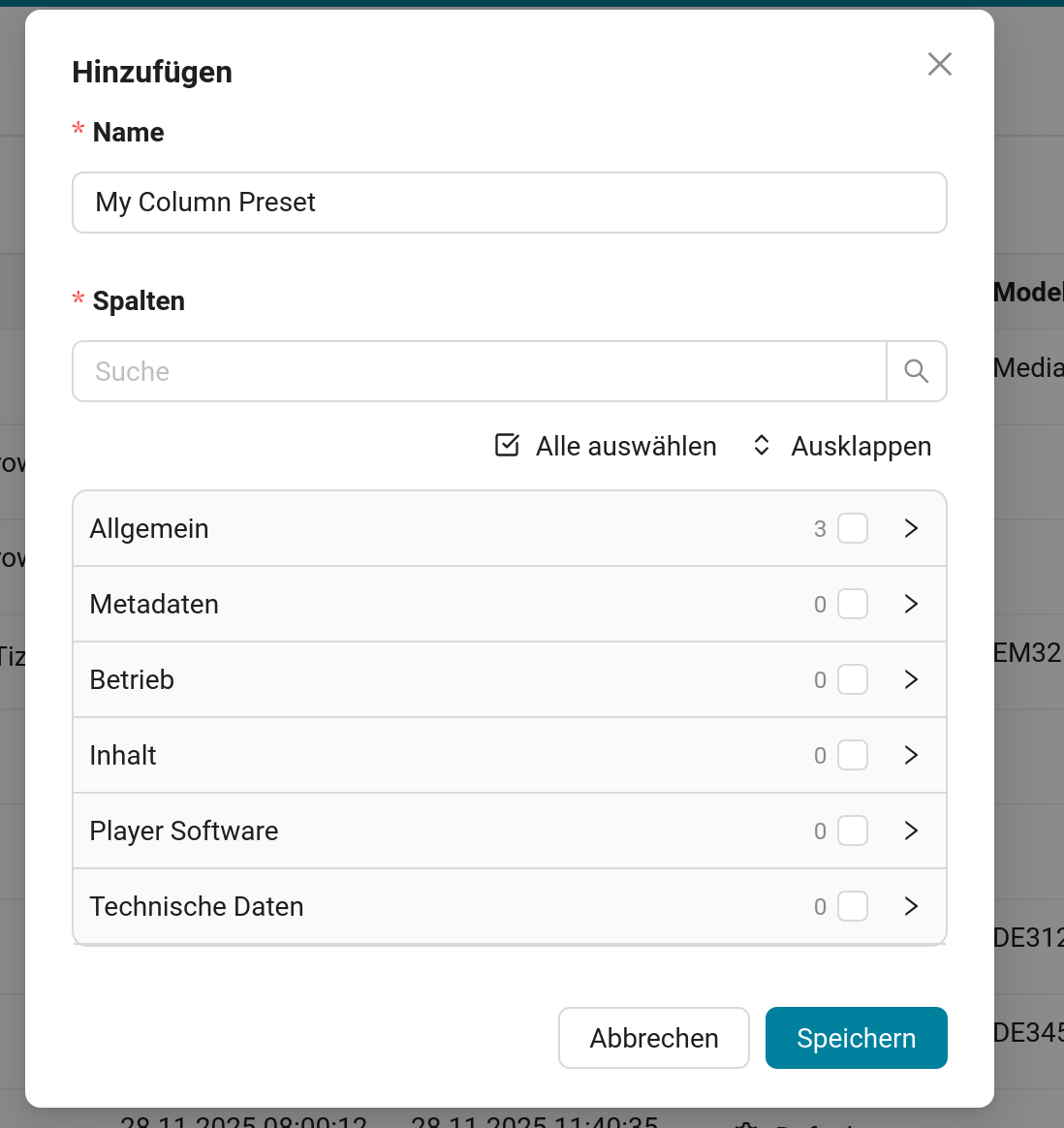
- Your selected columns now persist. Specifically, any columns you have selected at any given moment will still be selected the next time you return to sklera – whether you just closed the tab or log in for the first time in a while.
- You can now save presets. You can quickly create presets for the tables. These presets enable you to quickly switch between different useful views – for example, one view to quickly show you information on the installed software versions, or a view focused on content and location information.
- Columns can now be resized. Much like you're used to from software like Microsoft Excel, Google Sheets, or similar applications you can now resize a columns width freely, to ensure that every column offers enough space to its contents.
- You can reorder the columns. Even when configuring the columns to ones liking, you might want them in a different order. You can now simply grab the column headers and drag them to their desired position – and this change will also be saved!
More new features & fixes in 4.5.1
Tweaks & new features in 4.5.1
- Beta Feature: HiSense DM series screens now are able to play back images in native 4K resolution (with some limitations).
- Notice Board: The module now only displays categories based on the object permissions on the folders set in the library. Categories thus can be limited to specific users or user groups, and are hidden from view for other users.
- More detailed warning states: players starting with version 4.5-210 now will mark downloaded videos with playback issues if a playback error is encountered for easier identification of troublesome content.
- Samsung Tizen: The Safety Lock feature can now be toggled on and off via the sklera CMS. If enabled, trying to access the device settings via the device's physical remote control will require the user to enter a PIN code.
- Playout Management: The screen selection when editing a Playout will now show the number of selected screen groups and applied category filters.
Bugfixes in 4.5.1
- Display orientation on Samsung Tizen 6.5 and 7.0 devices can once again be set remotely via the sklera CMS.
- Library: Elements which had validity times set to specific weeks only did not properly display as active or inactive in the library or playlist editors. The playback on player devices however was never affected by this.
- Notice Board: Users whose only permission is to access the notice board module will now correctly be redirected to the module instead of seeing an error page.
- Some notification popups were removed too quickly due to a configuration error.
- Incident Management: ChromeOS devices populated the IP Address column with too much data, breaking table visuals.
digital signage made easy